

On WordPress.com, you can register a domain (for example, yourgroovydomain.com) to use instead of your site’s default address (such as yourgroovysite.wordpress.com). This guide will show you how to register a new domain on WordPress.com.
In this guide
To register a new domain, follow these steps:
- If you don’t already have an account, visit WordPress.com and sign up.
- In your site’s dashboard, navigate to Upgrades → Domains (or Hosting → Domains if using WP-Admin).
- Click the “Add a domain” button and choose the “Search for a domain” option:

- Type the domain you wish to register in the search field.
- If you don’t have a particular domain in mind, you can also search for keywords, and we will suggest different options that match your keywords.
- You can also choose a domain name with a different extension, like
.com,.blog,.org.net,.tv, and many more.
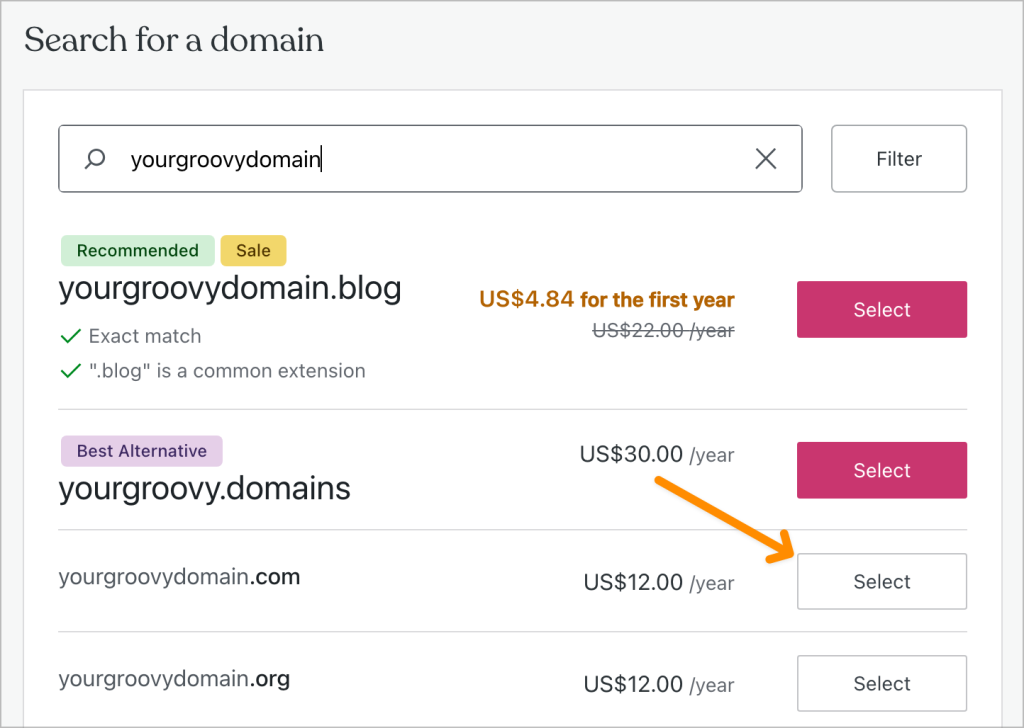
- If the domain is available, it will appear in the search results. Click the “Select” button next to the domain you wish to register.
- On the next screen, choose if you would like to add Professional Email or Google Workspace email to your domain, or you can skip this step with the “Skip” button in the top right corner. You can always add an email address to your domain later.
- On the next screen, you can choose to register the domain for multiple years (up to ten years) at a time by selecting additional years from the renewal duration drop-down box:

- Add your contact information if prompted. Ensure your contact information is correct, and you can access the email address (you may need to verify your email later.)
- Complete the checkout screen by making your payment. If you have yet to use the free domain credit in your plan, you will not be charged for the first year.
Once you register a domain following the steps above, make sure to verify the domain contact email, wait for the domain to come online, and set it as the primary address of your site:
When you register a domain, you will receive an email from domains-help@wordpress.com with a link or button to click to verify your domain’s contact information. This is a requirement for all registered domains as per ICANN (the governing body that regulates domain registrations.)
If the email you use to register your domain is the same as the email you have verified with your WordPress.com account, we are able to automatically verify your email address. If you’ve used a different email address, please watch your email inbox after registering the domain name.
⚠️
If you do not verify your email, your domain will be suspended and the associated website will go offline until you verify the email address.
It may take up to thirty minutes for the domain to be shown as verified once you click the “Verify Now” button in the email.
If you do not receive the email notification to verify your email address, check to ensure the domain contact information (specifically the email address) is accurate. Visit your dashboard, and go to Domains → your domain → Contact Information to review and update your email address.

A new domain should start working almost immediately, but sometimes, the domain may be unreliable in the first 30 minutes. In rare cases, there might be a delay of 24-72 hours before your domain becomes active.
This is referred to as the propagation time. During this time, the domain may not load at all, only sometimes, or in specific locations. This is because servers worldwide—from ICANN servers to local Internet service provider servers—take time to update. We have no control over domain propagation or way of speeding up this process. You can check on the propagation status of the domain by using a service such as whatsmydns.net.
You can visit your Domains and look under the Status column to the right of your domain. When the domain is fully operational, the status will say Active, like this:

You can have multiple domains connected to one website, so the primary address is the domain that your visitors will see in their browser’s address bar when they visit your site. All your other domains (including the .wordpress.com address and the non-www version) will redirect to the primary domain.
With any paid plan, you can set any domain as the primary domain. To choose your site’s primary domain, go to Upgrades → Domains (or Hosting → Domains if using WP-Admin). Choose your desired primary site address from the dropdown menu at the top, and then click the “Set as primary” button:

See our Set the Primary Address guide for more.
Privacy protection is enabled by default on all the registered domains. GDPR has resulted in changes to WHOIS that, in many cases, will prevent your contact information from being publicly published. Please see the Domain Registrations and Privacy page for more details.
We are required by ICANN to collect valid contact information for each domain registered at WordPress.com. Generally, this data is considered required for you to contract with us for domain registration services. We will email the registrant’s contact email address when consent for optional data elements is needed. You will not have to consent to share optional data to register your domain here. You can read more about domain registrations and privacy, and managing consent here.


