

Flickr allows users to upload, organize, and share their favorite photos and videos. This guide will show you how to share content from your Flickr account onto your WordPress.com site.
You can embed your Flickr images on your WordPress.com site. To do this, select one of your Flickr images, click the “Share this photo” icon, select “Link” and copy the link:
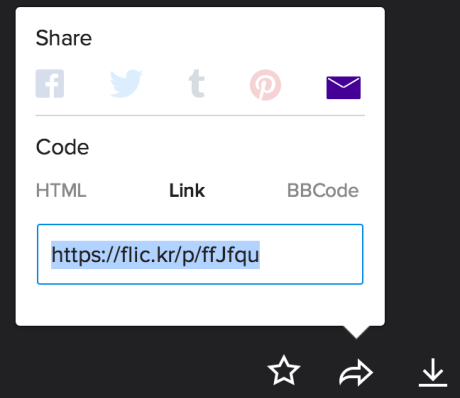
Then, paste that link on its own line in a post or page in your WordPress.com blog and your image will appear, linked to your Flickr image:

Alternatively, you can also insert the Flickr block to insert your image’s URL:

Copy and paste the URL for the video from your browser address bar:

We take care of the rest! You will be able to preview and play the video directly from the editor, and it will show live on your published page or post for anyone to view.
You can also use a shortcode to embed a video into a post or page. This will let you add additional options like specifying the height and width of the video. Embedding with a shortcode will not show the Flickr information overlaid on the video, the way that it will with the link embed option.
Here’s an example of how to use the Flickr embed shortcode:
[flickr video=http://www.flickr.com/photos/chaddles/2402990826]
or
[flickr video=2402990826]
You can add a shortcode to any page or post using a Shortcode block.
Publish the post or page, and the video will appear on your site with a Play button.
To specify the width and height, add w=n (width) and h=n (height) to the shortcode. For example, [ flickr video=2402990826 w=200 h=150] will embed a video in 200 x 150 px. (Do not include the space after the first bracket.)
If you are having trouble sharing your Flickr posts, take a look at our Troubleshooting Embed Links guide or the Flickr Blogging Help page.


