

Welcome to WordPress.com! Whether you want to start a blog, build a website for your small business, or something in between, this guide will help you learn the essentials for creating your site.
In this guide
Every WordPress.com site has a dashboard with a list of settings down the left side for making changes to your website.
To access your dashboard, visit the WordPress.com homepage and sign in. If you have more than one website in your account, you’ll see a My Sites or All Sites option at the very top to select the site you wish to work on.
Don’t worry about learning every single option you see in your dashboard. As you’re getting started, you’ll visit the following options most frequently in the beginning:
- Upgrades: Manage your plan, domain, and email.
- Posts: Write and edit blog posts on your site, if you plan on blogging.
- Pages: Write and edit your website pages. For example, About and Contact are common pages on most websites.
- Media: All your site’s images, videos, and other files are stored here.
- Appearance: Control the design of your website.

Interested in migrating your site to WordPress.com?
For a short time, we’re offering migrations from your existing WordPress site to WordPress.com for free! Sign up for a new Creator or Entrepreneur plan and our expert Happiness Engineers will handle the migration for you.
The design of a WordPress website is known as the theme. In your dashboard, navigate to Appearance → Themes to choose from a large collection of theme designs for your website. All WordPress.com themes are professionally designed to adhere to modern web design principles, optimized for mobile, and conform to accessibility standards.
The theme you choose is a starting point – you’ll later change, add, and remove any elements to make the design your own.
Focus on the overall layout, rather than the theme’s subject matter shown in the demo. A theme’s demo site may showcase an example of a furniture store, a music portfolio, a fashion site, or a food blog. However, your site can be customized for any topic imaginable once you swap out the demo text and images with your materials.

Once you’ve selected a theme, you can visit the Site Editor to customize your website’s text, images, and other elements.
When editing in WordPress, each element on your site is known as a “block” — think of these as the building blocks of your website. There are blocks for text, images, columns, buttons, and much more.
You can add content to a page by inserting various blocks. To insert a block, click on the + block inserter icon, which is found in various places within the editor screen:

Here are some of the most common blocks you will use a lot:
- Paragraph block: the default block to add regular text.
- Heading block: add header text to the post or page.
- Image block: add individual images.
- Gallery block: add collections of images together.
- Cover block: display a full-size header/ banner-style image.
- Columns block: place content side by side in columns.
- Group block: place multiple blocks inside a container for easy editing.
When you click on the + block inserter icon, you can search for different types of blocks or scroll down to see what’s available. Once you add blocks, you can reorder them using the left and right arrows or by clicking and dragging.
Whenever you add a block and select it, you can make changes using two areas of settings:
- The toolbar, which appears just above or below the block.
- The sidebar settings, on the right side of the editor:

If you do not see the sidebar on the right, click the Settings icon in the top right corner to bring up the settings. This icon looks like a square with two uneven columns:

You can remove a block by selecting it, clicking on the ellipses (three dots) menu in the toolbar, and choosing Delete.

Once you’re happy with how your page looks, click Save in the top right corner.
📌
Worried about people viewing your site before it’s done? Your site will be in a private “Coming Soon” mode until you launch it. Go to Settings → General and scroll down to Privacy to launch the site! Visit the Privacy Settings guide to learn more.
Have some more pages you want to add, or some blog posts? You can add as many pages and posts as you want to your site. Let’s learn how.
What’s the difference between a page and a post?
A page is best used for content that isn’t going to change very often. Good examples of pages would be a home page, an about page, a contact page, or a page that lists your products or services.
Posts, or blog posts, are more like news articles. Good examples of posts include updates about your industry, a personal journal, movie reviews and other similar specific pieces of writing. Every site built on WordPress.com has the ability to add a blog, but you don’t have to use it!
Learn more about pages vs. posts and the difference between the two.
From your dashboard, go to Pages and click Add new page (or Posts and click Add new post) to open the WordPress editor.
For pages, you will see an option to select a pre-designed layout upon creating a new page. You can choose a layout and edit it further, or start with a blank page.
When working on a page or post, you’ll have access to the following options explained below:
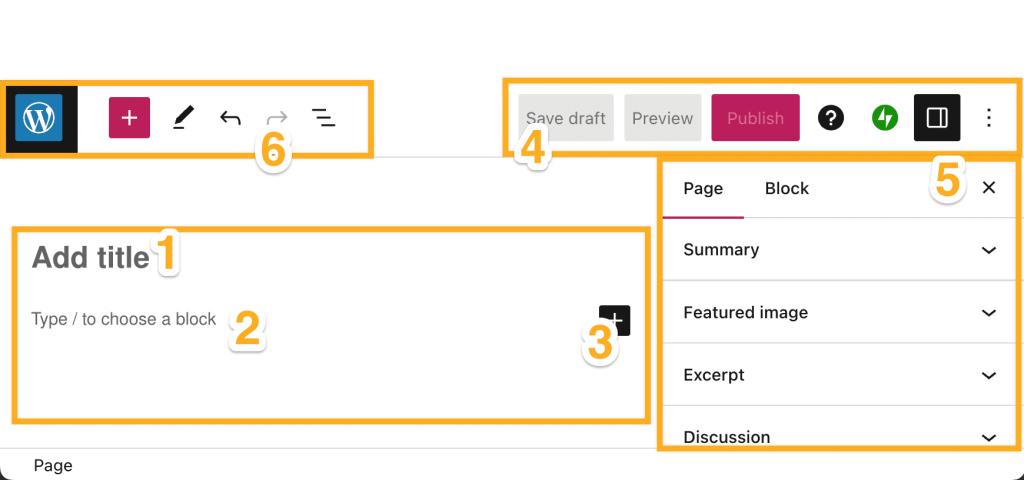
- Type the title of your page or post.
- Add the main content of your page or post here (text, images, and more.)
- The + block inserter to add new blocks.
- Save, preview, publish, access help, and more options.
- The settings sidebar.
- Exit the editor, another + block inserter button, and additional editing tools, including the handy List View.
Now you should have a few pages of content to work with. Let’s make sure people can view them by adding a menu. To do so, go to Appearance → Editor in your dashboard:

You’ll see the beginnings of a navigation menu at the top of your site:
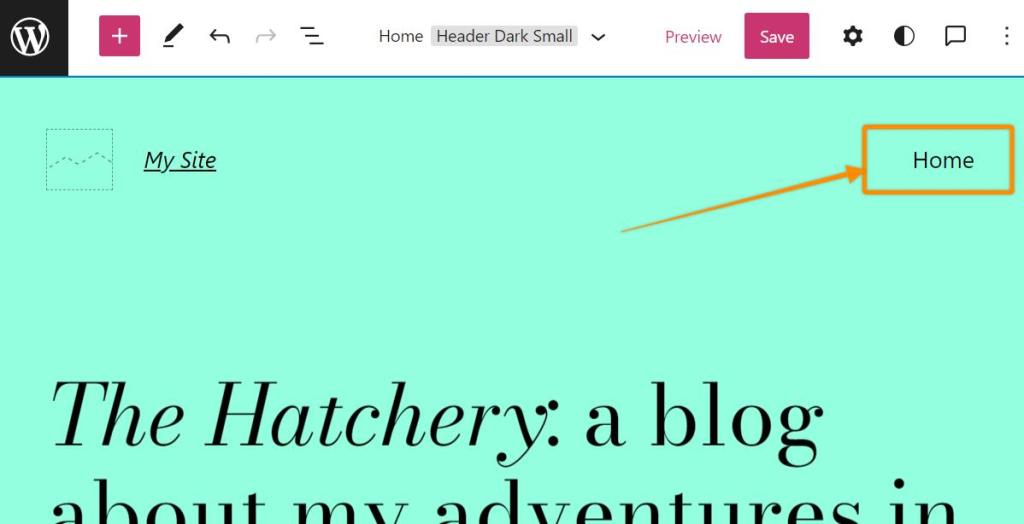
This is the Navigation block, used to display a list of links to the various pages of your site. You can click the block to add pages to the menu, create drop-down menus, and more. Remember, your pages must be published before adding them to your navigation menu.
This guide should help you get up and running, but maybe there are some more features you’re looking to implement! Here’s a list of common questions and features:
These are called category pages! To set these up, create a few blog posts and assign categories to them when editing the post. Then, you can add a category to your menu. Only blog posts given that category will appear on that page.
Alternatively, you can use the Query Loop block to display a list of blog posts with a specific category on any page.
All sites on WordPress.com come with a large number of built-in features that should cover what you need. If you wish to install a plugin, upgrade to a plugin-enabled plan.
Any site with a WordPress.com plan can connect to a custom domain. You can use one you already own or register a new one with us.
You can add a domain to your WordPress.com website before, during, or after you work on the site’s content and design. The content, design, and any redesigns exist separately from the domain and cannot be lost by changing or adding a domain later.
You can change themes by going to Appearance → Themes. Feel free to change themes as many times as you like! Changing your theme affects the look and feel of your site but won’t delete your content.
Keep in mind that some themes may require additional steps to customize them. These steps will be detailed on the theme setup page.
By purchasing a WordPress.com plan, you have access to our global support team to assist you with any questions related to your website. Click the ? icon in the top right corner of your dashboard to reach our friendly Happiness Engineers.
Yes! If you’d like to have your site built for you, and then all you’re responsible for is maintaining it, our team is happy to build your site for you.


