

Post by Voice is a way to publish audio posts to your blog from your phone. You call a phone number, enter a secret code, record a message, and we handle the rest.
In this guide
Post by Voice is unavailable on sites with plugins or third-party themes installed.
In order to use Post by Voice, you will first enable the feature on your site and generate a secret code. The secret code is unique to you and your site so it is important to keep it secret.
To get started, follow these steps:
- Visit your profile by clicking on your avatar in the top right corner of WordPress.com, or by visiting this link.
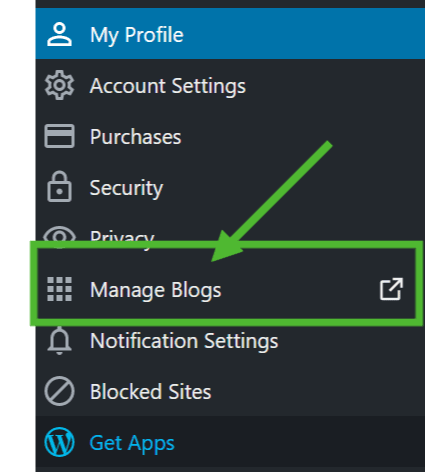
- Click on Manage Blogs.
- Click the Enable button under Post by Voice on the site you want to enable this feature for.

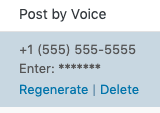
After you enable Post by Voice, you’ll see a phone number and a unique code. This code will allow anyone to send an audio post to your site, so keep it safe!
You can regenerate your Post by Voice code at any time by hovering over the code, and clicking the Regenerate option. Or, disable Post by Voice completely by clicking Delete
Call the phone number listed on the My Blogs screen, enter your secret code when prompted, and follow the instructions.
Once you are done, a new post titled “Audio Post” will be published to your site. It will be assigned the default category and tagged with “Post by Voice”. The audio file itself will be stored in your Media Gallery and named audio-post-yyyy-mm-dd-unique-identifier.mp3 where the the italicized part of the file name will be replaced with the date of the post and a unique numeric identifier.
If your secret key is compromised, others will be able to publish audio posts to your site.
- Visit your WP Admin Dashboard by adding /wp-admin/ to the end of your site’s url (e.g.: example.wordpress.com/wp-admin)
- Click on Dashboard → My Blogs.
- Hover over the secret key you want to regenerate, and click the Regenerate link that appears.
If you would like to disable the Post by Voice feature, use the Delete link below the secret key. You can re-enable it at any time.
- Post by Voice is powered by the Twilio API.
- The maximum length of a recording is 1 hour.
- If there is 10 seconds of silence, the recording will end.
- You do not need any upgrades to use Post by Voice.
- Normal calling rates will apply for the phone call.


