

Pages and posts both display content on your site, but are used for different purposes. This guide explains the differences between a page and a post on your WordPress.com site.
In this guide
A website uses pages to display content – Home, About, and Contact are common examples of pages. Pages are static i.e., they are not associated with a date or time. They are permanent fixtures of your site for people to access at any time.
The URL for a page looks like this: http://yourgroovydomain.com/page-title/
Pages are typically listed in your site’s menu at the top of the site.
Posts are individual pieces of time-based content on a site. Think of them as articles or updates that you share to offer up new content to your readers.
The URL for a post looks like this: https://yourgroovydomain.com/2024/03/17/post-title/
You can display posts on your website in different ways, such as on a blog page or grouped by category.
There are several ways to make your posts appear on a page.
Your theme may include an Index template (for displaying all posts) and Archive template (for displaying posts by category, tag, month, and year.) Learn how to edit these templates.
Other methods you can use to display posts on a page:
- Insert a Blog Posts block onto any page.
- Insert a Query Loop block onto any page.
- Create a default post page to automatically update with your posts.
- Create a custom blog page for your posts.
- Display posts by category.
Pages and posts are the main types of content on a WordPress site. You can also create other types of content (known as Custom Post Types or CPT) such as portfolio projects and testimonials.
On eligible plans, you can also install plugins to add additional types of content to your site, such as products via the WooCommerce plugin or a real estate plugin for property listings.
You might find that you’ve created a post when you intended to create a page, a portfolio project (or any other post type), or vice versa. You have the flexibility to convert a post into a static page, a page into a post, or any other content type by copying the content from one to the other.
Follow these steps to move your post or page content to the correct post type (page, post, portfolio, etc.):
- Visit your dashboard.
- Navigate to Pages or Posts and click on the page/post you wish to convert.
- Click on the ellipses (…) in the top right corner of the editing screen.
- Click Copy all blocks:
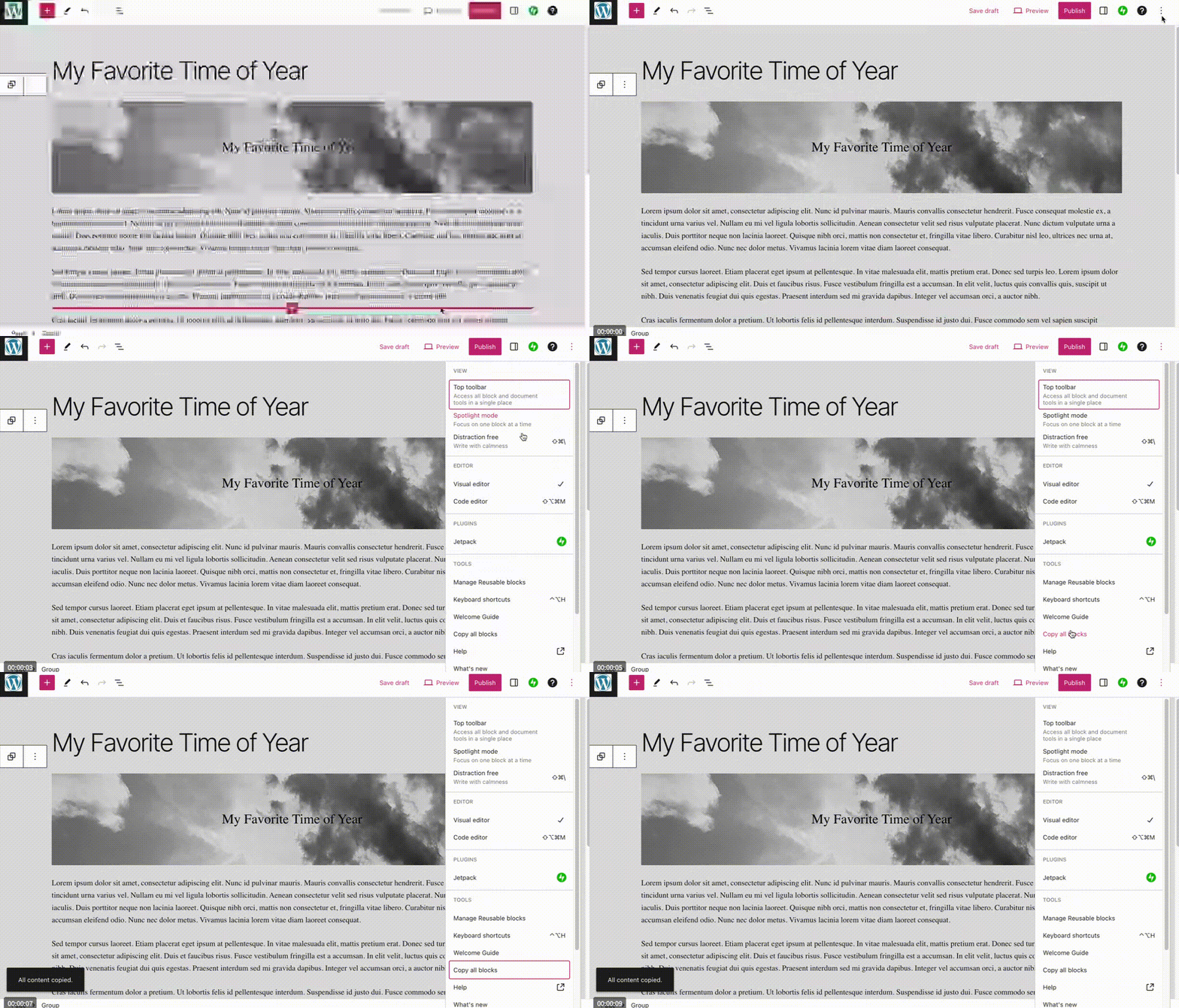
- Open a new tab in your browser and navigate to Pages or Posts (whichever you wanted to create.)
- Click Add New to open a new blank page or post in the editor.
- In the editing screen, click your mouse on the first line of the content area, where it says “Type / to choose a block”.
- Paste the blocks you copied from Step 4 by right-clicking and selecting Paste or using CTRL + V on Windows or CMD + V on Mac:

- Click Publish to publish your new post or page.


