

You can schedule blog posts or site pages to automatically publish themselves at any time in the future. This guide will show you how to change the date of any page or post.
In this guide
To set a post or page to publish in the future, follow these steps:
- Visit your dashboard.
- Click on Posts or Pages from the options on the left.
- Add a new post or page (or select an existing one.)
- In the post or page settings on the right, view Summary.
- If you don’t see Post/Page Settings, click on the settings icon next to Publish. This icon looks like a square with two uneven columns:

- Next to Publish, click the Immediately link to open up the scheduling calendar.
- Select the date and time you want the post or page to publish.
- Click Schedule or Update to schedule the post or page with the chosen date and time.
If you have already scheduled a post, a dot will appear beneath that date on the calendar, as shown under July 9th in the image on the right.
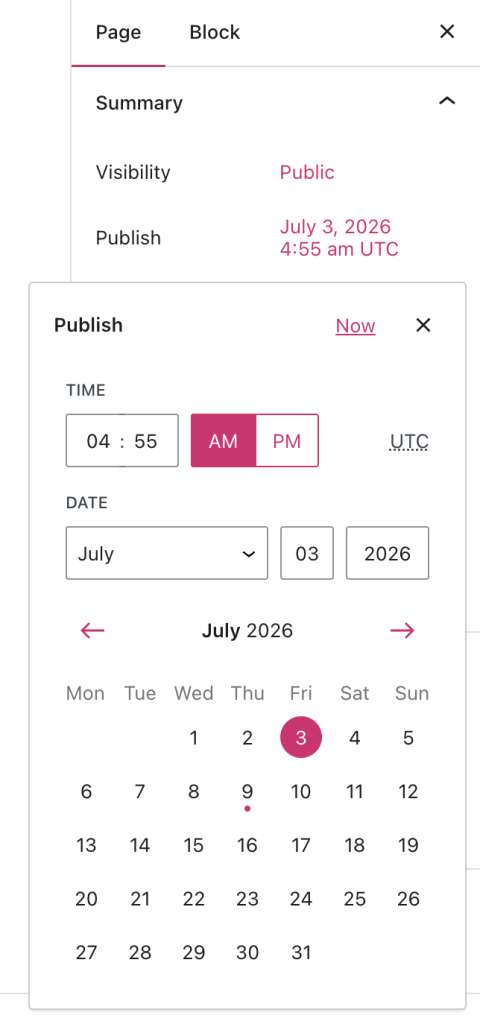
If you click Publish before scheduling, you will have one more opportunity to schedule your post or page before publishing it:

Sometimes you might want to set a post or page to be published in the past. For example, if you’ve just returned from a long trip, you might want to write a post for each day of your travels and have the post’s date match the days you were away.
To backdate a post or page, follow the same steps to schedule a post or page as described above, but select a date in the past and click Publish.
You can reschedule a post or page by selecting the new date and time the post or page will be published as described above. The link for the post will change to reflect the new publication date.
When you reschedule a post, it does not send a new notification to your email subscribers. If you want an email notification sent, consider making a copy of the post and publishing it as a new post.
If you have scheduled a post or page to be published in the future but changed your mind, you can remove the scheduled date to publish it immediately.
Follow the same steps to schedule a post or page. In the calendar view, select the current date and time or click the Now link to set the content to publish immediately.
If your scheduled post or page does not appear, you can check the following:
- Is your timezone set correctly in Settings → General? The scheduled time may have not yet arrived in your site’s time zone.
- Did you save your post or page as a draft rather than schedule it? You must click the Schedule button for the post or page to publish.
- If you have over 100 scheduled posts, reduce that to less than 100. Only 100 scheduled posts are possible at a time.
- Is your post or page visibility set to private?
Scheduled posts will be triggered by the first visit to your site on or after the exact date and time you set. If the scheduled time has come and gone and your post or page has not been published, log out of WordPress.com and view your blog’s front page. Your visit should cause the post to appear.
This is required because scheduled posts use “cron jobs.” A cron job is an automated task that runs at a specified time or interval. This will only trigger on page load, so scheduled posts are published when the site is visited.


