

The Reblog button is an easy way to share content from another blog on your own blog. This guide will explain how to reblog a post and turn the Reblog button on or off for your website.
In this guide
If a post has reblogs available, the Reblog button will typically appear at the bottom of the post next to any sharing buttons.
To reblog a post:
- Click the Reblog button at the bottom of a post:

- In the window that appears, choose which of the websites you own that you wish to reblog to.
- A draft post will appear with the reblogged content embedded. You can add a title and any other content via the WordPress editor.
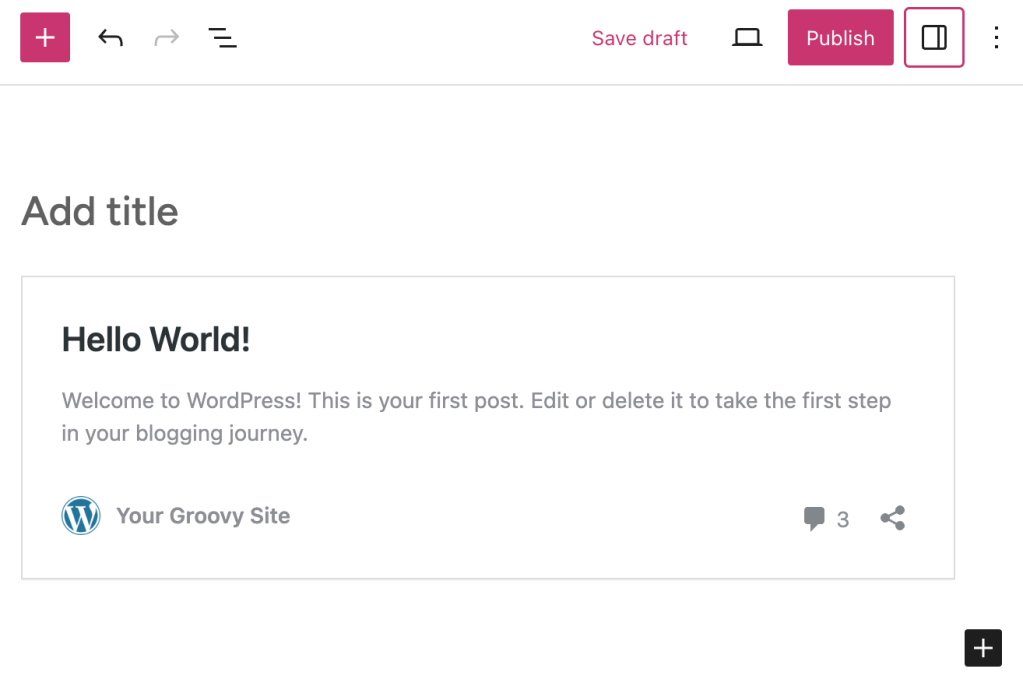
- Click the Publish button to send the post to your blog.
When viewing posts via Reader, you can click the Reblog button to reblog a post:

To turn Reblogs on or off:
- Visit your site’s dashboard.
- Navigate to Tools → Marketing.
- Click on the “Sharing Buttons” tab.
- Tick or untick the box next to “Show reblog button“.
- Click the “Save changes” button.

If your site uses the Like block, you can turn off reblogs in the Like block settings.
The Reblog button is not accessible to plugin-enabled sites. To provide similar functionality, you can use the AddToAny Share Buttons plugin to add a WordPress sharing button. However, in the case of plugin-enabled sites, reblogging can still be accomplished within the Reader.
If your post is reblogged, an excerpt of your post will be published on the reblogger’s site (with a link back to your original post).
You’ll receive a reblog notification in the post comments (you might need to approve the comment first) and an email notification of the reblog.
Reblogging is designed to give all WordPress.com users an easy way to share great posts they find on their own sites. If your content is reblogged on a site you find objectionable, you can ask the blogger to remove it, either by leaving a comment or through their contact form if one is available. Likewise, if you aren’t sure if another blogger would want their post reblogged on your own site, there’s no harm in asking them for permission first.


