

Your WordPress.com website is optimized for search engines by default. However, there’s more that you can do as a website owner to influence how people find you through search engines like Google.
In this guide
SEO stands for Search Engine Optimization. It refers to techniques you can use to help ensure that your site ranks high in the results of search engines such as Google and Bing.
To ensure your website gets indexed in search engines, review your site’s Privacy Settings at Settings → General (or Hosting → Settings if using WP-Admin). To allow search engines to index your site, your site must be set to public, and the checkbox for Discourage search engines from indexing this site should not be checked.
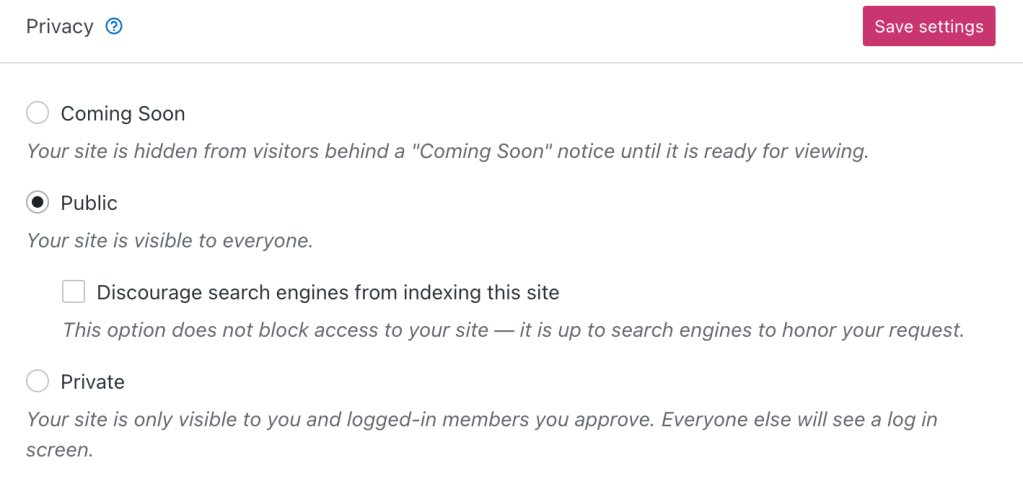
A public site ensures your site can be seen by search engines, but keep in mind that it can take Google and other search engines between four to six weeks to discover a new website.
Every website owner wants their website to appear at the top of search results. However, the processes that control this are handled by each search engine, and they are always changing. The tips and resources in the rest of this guide will help you to improve your SEO.
There is a difference between being indexed by search engines (appearing somewhere in the results) and having a high ranking (appearing on the first page of results.) Ranking in search engines means the search engine has decided your website closely matches what the person is searching for. Search engines use a variety of criteria to determine if a site should rank high for a specific search request.
Ranking higher in Google and other search engines can take time. Here are some tips you can use to help influence the process:
- Research your keywords: Figure out what keywords you want to come up in searches for. For example, if your site is about boating, you might want to show up for terms like “boats,” “sailing,” and “crew.” Work these keywords naturally into your post titles, headings, content, and URLs.
- Describe your images: A search engine can’t “read” an image, but it can read what an image shows if you provide it with descriptive image alt text.
- Post new content regularly: The more you post, the higher your search ranking. Google likes sites that update frequently. You don’t necessarily need to post every day or every week – find a cadence that works for you and stay consistent.
- Share your site: Automatically share your posts to social media when you publish, and reach a larger audience. The more organic traffic your site gets, the better it looks to search engines.
- Verify your site with search engines: Verify your site with Google Search Console and other search engines by following the steps in this guide. This step isn’t necessary for your site to be indexed, but it can speed up the process and give you useful insights to learn from.
⚠️
There is no setting, plugin, service, or person that can guarantee your site shows up first in search rankings. If someone is trying to sell you SEO services that promise fast results, they may be trying to drive fake traffic to your site. This can penalize your site’s SEO and lock you out of participating in ad programs.
This section of the guide applies to sites with the WordPress.com Creator or Entrepreneur plan. If your site has one of our legacy plans, this feature is available on the Pro plan.
In addition to the above techniques, our higher-level plans include additional SEO tools you can learn about here.
You do not need a plugin-enabled plan for your site to be indexed and ranked in search engines. You do not need any particular plugin, either. However, plugins can provide useful tools to fine-tune your search results and optimize your site’s ranking.
If your site has plugins enabled, add a custom domain name for your site to be indexed by Google. The.wpcomstaging.com domain will not be indexed by search engines.
Yoast SEO is a powerful plugin that can help you optimize your website for search engines. It’s easy to use and provides many features that can help you improve your website’s visibility. Some of the benefits of using Yoast SEO include optimizing your content for specific keywords, creating custom meta descriptions and titles, and analyzing your website’s performance. Yoast SEO also has a paid Premium version that offers additional features such as internal linking suggestions, content insights, and a redirect manager.
If you install an SEO plugin, it will replace the built-in tools provided by your plan. Solutions such as Yoast Premium offer an alternative suite of SEO tools for your site. Installing more than one SEO plugin at a time is not recommended, as multiple plugins with the same function can cause conflicts or errors.
Join Our Free SEO Course
Understanding search engine optimization (SEO) is valuable for anyone looking to improve their site or blog for both search engines and humans. This course will give you a solid foundation of what you can do to ensure people have the best chance to find your content when they search online.
Watch our recorded webinar that will show you how to do effective keyword research for your site’s SEO:
For the sake of brevity, the following questions all refer to Google. However, the same answers apply to all search engines.
Search engines can take 4-6 weeks or more to show any newly created sites.
Ensure your site’s privacy settings are set to Public, with the option “Do not allow search engines to index my site” not selected.
While not necessary to be included in Google’s index, connecting your site to Google’s Search Console can help Google include your site more quickly.
If you make changes to your site, the site previews provided by Google may take some time to update (anywhere from a few days to a few weeks.)
It’s up to Google to decide what information to display as a search preview. You can try adding an excerpt to your post or page and updating your site title and tagline, but what is displayed is ultimately decided by Google.
There are many tools you can use to audit your site’s SEO, including Google Search Console and Yoast SEO. WordPress.com support cannot assist with processing these reports. WordPress.com is optimized for SEO on a technical level, and you, as the site owner, can optimize your site’s content. For help with that, we encourage you to follow the tips on this page as well as the resources provided by the third-party tool you have used to check your site’s SEO.
“A description for this result is not available because of this site’s robots.txt – learn more”
If you had your site visibility set to Private for a long time and just changed it to Public, you would not see the description of your site in Google right away. Instead, you will see the above message.
Allow some time for Google to crawl and index your site, and the description of it will eventually update on its own.
Microsoft’s Bing search engine shows “We would like to show you a description here but the site won’t allow us.” under your site’s URL in these cases.
“No Information Available for This Page”
If search engines index your site before you add a meta description, they may display the message “No information available for this page” instead of a description.
Make sure you update your meta description. Then, allow search engines two to four weeks to re-index your site and display the new information.
By default, every website hosted on WordPress.com has its own robots.txt file that search engines will pick up. You have a few options if you need to add additional customizations to your robots.txt file.
This section of the guide applies to sites with the WordPress.com Creator or Entrepreneur plan. If your site has one of our legacy plans, this feature is available on the Pro plan.
- You can create a custom robots.txt file and upload it to your root directory via SFTP.
- You can use a plugin designed to edit your robots.txt file, like Robots.txt Editor.
- Plugins designed to improve SEO (like Yoast or Rank Math SEO) also include settings for editing your robots.txt file.
Remember, most plugins are developed by third-party developers. They will be more familiar with installing, configuring, and troubleshooting issues with their plugin. Any good plugin will have a method for you to contact them for help.


