

The security of your website and your personal data is always a priority. This page describes what we do to help protect your site and your personal information, along with added steps we recommend you take to do the same.
At other WordPress hosts, the site owner is typically responsible for setting up security protection with a third-party plugin. Here at WordPress.com, we handle this on your behalf. Here are some of the built-in features and processes that are already protecting your website:
Strong encryption is critical to help ensure your privacy and security. We encrypt (serve over SSL) all WordPress.com sites, including custom domains. We consider strong encryption so important that we do not offer the option to disable it, which would compromise the security of your WordPress.com site. We also 301 redirect all insecure HTTP requests to the secure HTTPS version. Learn more about how we Secure Your Domain With SSL.
Jetpack Scan, our security tool enabled on all WordPress.com sites, checks the following files on your site automatically each day:
- Plugins
- Themes
- Uploads
- Root directory files like
wp-config.php - Other select files inside the
wp-contentdirectory
Jetpack Scan looks for dangerous plugins or themes, malware, and other vulnerabilities, which our security team swiftly resolves.
Our systems back up your WordPress.com website data regularly, so in case of an event that causes data loss (like a power supply failure or a natural disaster, for example), we can recover it. While all WordPress.com sites are protected, sites with higher-level plans can access daily backups via the dashboard.
We run firewalls and have processes to alert us about unauthorized attempts to access WordPress.com accounts. Our web application firewall (WAF) examines incoming traffic to your website and decides to allow or block it based on various rules. This adds an important layer of protection to your site, particularly when attackers actively exploit unpatched vulnerabilities.
We continuously watch web traffic and monitor suspicious activity. Our security measures help protect against unwanted login attempts, brute force attacks, and distributed denial of service (DDoS) attacks.
We have a dedicated security team committed to protecting your data. We work to eliminate malware and address potential security risks surfaced by Jetpack Scan, our security tool enabled on all WordPress.com sites.
We operate a bug bounty program via HackerOne to reward people who find bugs and help us improve the security of our services.
Please bear in mind that if you wish to attempt to test our security measures on your WordPress.com-hosted site, we do not allow for whitelisting. You are free to test whatever you wish, but as our system cannot ensure you are not malicious, your IP address may be temporarily blocked.
No way of transmitting data over the Internet, and no method of electronic storage is perfectly secure. We can’t guarantee the absolute security of your site or account — no service can. But keeping your site and personal data well-protected is very, very, very important to us.
Security works both ways. There are steps you can take to safeguard your website and WordPress.com account:
Your password is the weakest link to the security of anything you do online. It’s the key to your website, email, social networking accounts, and any other online service you use. If your password is easy to guess, your online identity is vulnerable. All it takes is one person to guess your password, and they could deface your site, steal your domain, or impersonate you.
Every password you use has to be easy to remember and hard to guess. A random set of numbers and characters makes for a hard-to-guess password, but they’re also hard to remember. On the other hand, you’ll probably never forget your birthdate or the name of your first pet, but these make for very bad passwords, as they are increasingly easy to guess or find out.
On WordPress.com, you can use a very long password with any combination of letters, numbers, and special characters, so the security of your password – and your website – is really up to you. We’ve collected some tips for creating strong passwords.
In addition to a strong password, we recommend adding another layer of account security with two-step authentication. Two-step authentication adds an extra step to your login process: after you enter your password, you must provide a code from your phone or a physical key. This is more secure because even if someone knows your password, they cannot access your account unless they also have access to your phone or physical key. Learn how to enable two-step authentication here.
You can protect your account by logging out when you are finished working. This is especially important when working on a shared or public computer. If you don’t log out, someone can access your account by viewing the browser history and returning to your WordPress.com dashboard.
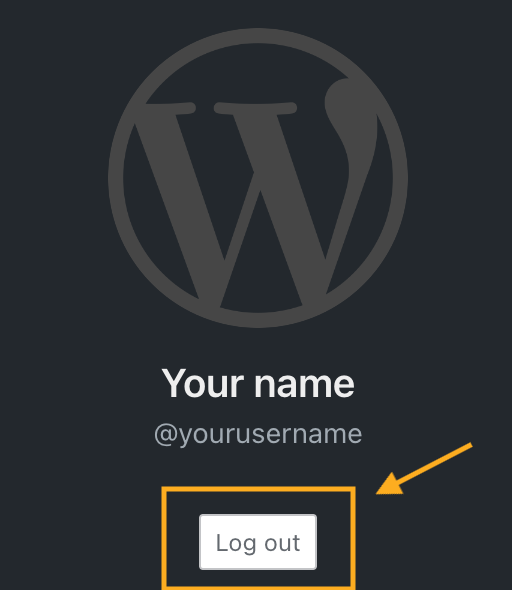
To log out of your WordPress.com account, click on your profile at https://wordpress.com/me. Then, click on the Log Out button:
You can invite other people to contribute to your website. This is ideal for group blogs with multiple authors, magazine-style sites with an editorial workflow, or any other large site where you want to share some of the administrative load.
However, sharing the load also means sharing the responsibilities. That’s why on WordPress.com, you can set different roles for each user you add to your site. Each role has different levels of permission:
- Contributor: the most limited role; can only write draft posts but can’t publish them.
- Author: can publish posts and upload images but can’t touch other users’ posts.
- Editors: can edit or publish any user’s posts, moderate comments, and manage categories and tags.
- Administrators: have full control of the site – they can even delete it.
When adding users, choose the role that best suits what you want them to do on your website. If you’re setting up an account for a user who only plans to write a few posts, make them a Contributor. Reserve the Author and Editor roles for trusted users with a long-term commitment to your site.
Finally, be particularly cautious with the Administrator role. When you make another user an Administrator, you give them full access to make any changes to the website. Only add an admin that you trust, and remove them when you no longer need them to access the site.
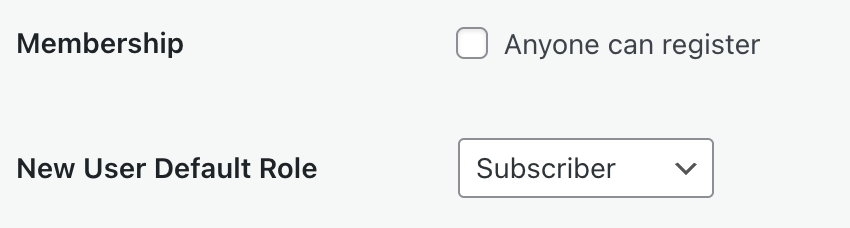
Plugin-enabled sites include a “Membership: Anyone can register” option that allows anyone to create an account on your site via the default registration page. Depending on the default role granted, this setting can create a security risk varying from granting complete control over a site to allowing unwanted spam users.
The setting is disabled by default. You may need to activate it when creating a custom membership site or when using membership plugins. To verify if your plugin requires this setting, please refer to the plugin’s documentation. If you are not using a membership plugin that requires this setting and do not have a custom setup relying on this option, we recommend keeping this option deactivated.
To locate the “anyone can register” setting, take the following steps:
- Navigate to Settings → General and select the Classic view from the View tab in the upper right corner. If you are already using WP-Admin, you will see the Classic view by default.
- In the WP-Admin General Settings page, locate the Membership setting and uncheck the box.
- Click “Save Changes” at the bottom of the page.
⚠️
If WordPress.com Secure Sign-On (SSO) is active, the registration option will be more difficult to get to but anyone who knows the default registration link (including bots) will still be able to register while the setting is active.


