

Your site’s Privacy settings control who can view your site, allowing you to make the site public, private, or “Coming Soon”. This guide explains each setting you can use on your site.
In this guide
To access your site’s privacy options:
- Visit your site’s dashboard.
- On the left side, navigate to Settings → General (or Hosting → Settings if using WP-Admin).
- Locate the Privacy section.*
* Do not confuse this with Settings → Privacy on a plugin-enabled site, which is used for creating a privacy policy.

⚠️
If you do not see a “Privacy” section, you have not launched your site yet. Learn how to launch your site.
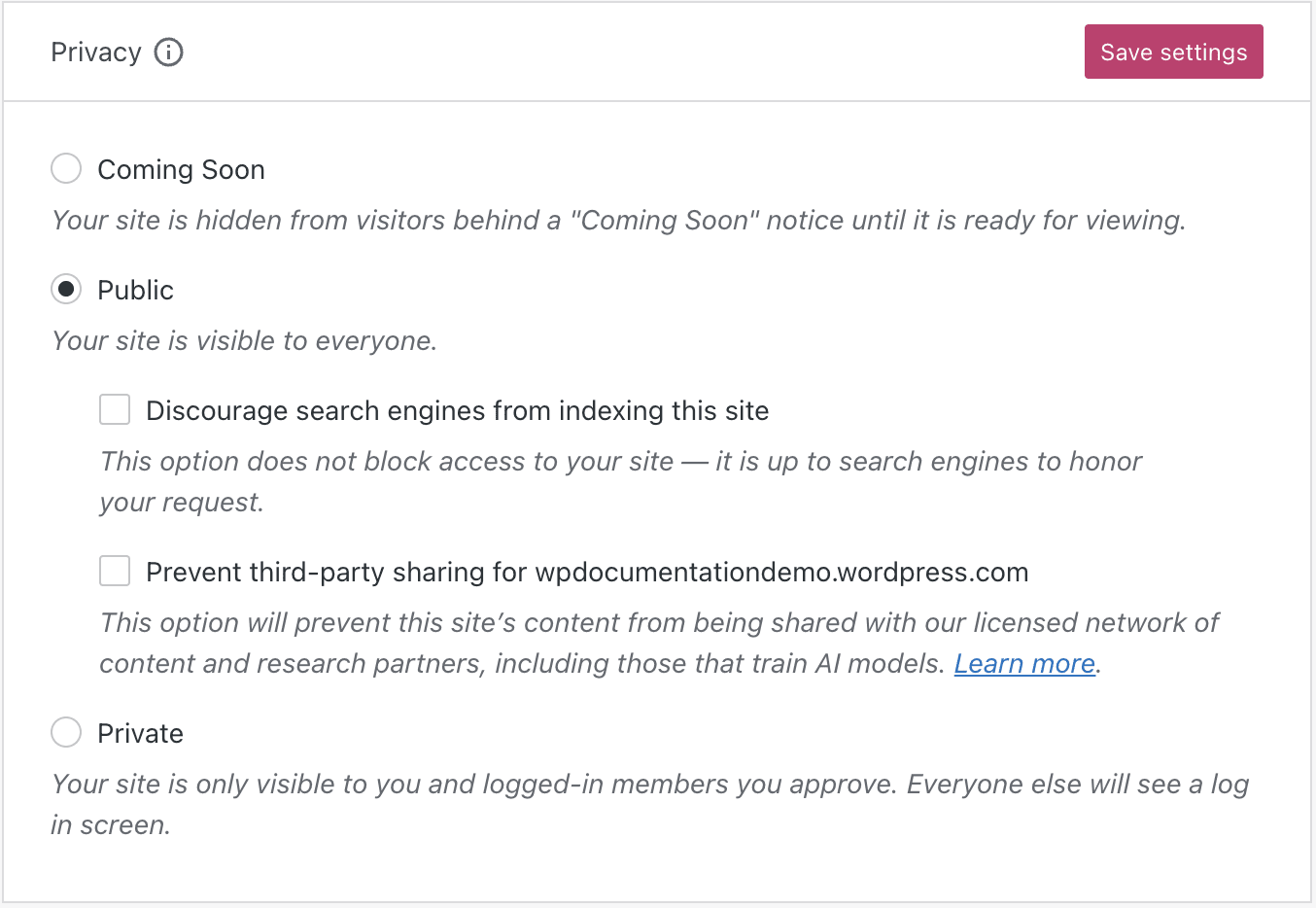
The “Privacy” section includes the following options:
- Coming Soon
- Public
- Private
The three options are explained in the following sections.
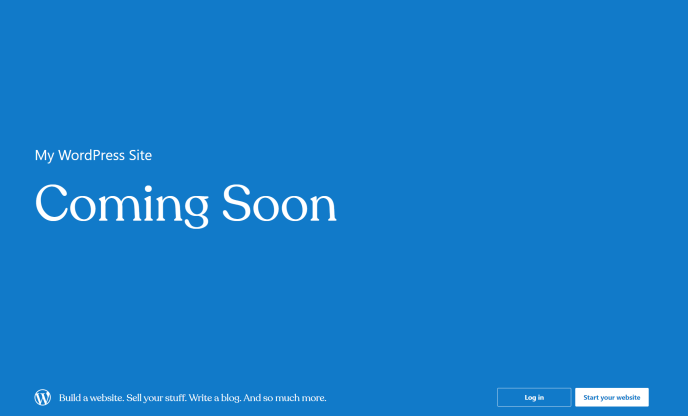
To give you time to create your site before you officially launch it, new sites show a “Coming Soon” page by default. New visitors will see a landing page letting people know that a site is being built. You don’t need to worry about your unfinished site being viewed before you’re ready.
If you have a plugin-enabled site and do not see the Coming Soon option in Privacy Settings, ensure the WordPress.com Editing Toolkit plugin is active on your site. You can also install any ‘Under Construction’ or ‘Maintenance’ plugin to design your own custom ‘Coming Soon’ page.
This section of the guide applies to sites with the WordPress.com Creator or Entrepreneur plan. If your site has one of our legacy plans, this feature is available on the Pro plan.
While your site is in the “Coming Soon” mode, you can generate a unique preview link for your website, allowing your team or clients to access the Coming Soon site without having to log in. This way, you can easily show off your work-in-progress and get feedback while you continue to work on the website.
To create a preview link, follow the below steps:
- Visit your dashboard.
- On the side, navigate to Settings → General (or Hosting → Settings if using WP-Admin).
- For a site that has not been launched yet, locate the “Launch site” section.
- For a site that has already been launched, locate the “Privacy” section and ensure the site is in Coming Soon mode.
- Generate the link by clicking on the “Share site” toggle button.
- Click the “Copy” button to copy the preview link to share it with anyone you would like.

This is the setting used by most sites. It allows everyone to see your site and enables your site to be included in search engine results and other content sites.
To make your site public:
- Visit your site’s dashboard.
- Navigate to Settings → General (or Hosting → Settings if using WP-Admin).
- Select the “Public” radio button under “Privacy”.
- Click the “Save settings” button.
⚠️
If you do not see a “Privacy” section, you have not launched your site yet. Learn how to launch your site.
If you want all human visitors to be able to see your site but don’t want your site to appear in search engines like Google, this option will block most web crawlers for search engines.
To discourage search engines from indexing your site:
- Visit your site’s dashboard.
- Navigate to Settings → General (or Hosting → Settings if using WP-Admin).
- Then under the Privacy section, tick the “Discourage search engines from indexing this site” checkbox.
- Click the “Save settings” button.
Please note, however, that not all search engines respect this setting.
Using the “Discourage search engines” option will also exclude your blog posts from showing in the WordPress.com Reader.
This option can be used to restrict your site’s content from AI training and third-party use.
To opt out of sharing your site’s public content with third parties (including AI models):
- Visit your site’s dashboard.
- Navigate to Settings → General (or Hosting → Settings if using WP-Admin).
- Then under the Privacy section, tick the “Prevent third-party sharing” checkbox.
- Click the “Save settings” button.
We work with various third-party partners who license content, including companies and researchers looking to understand content across the web. This collaboration helps us foster innovation and encourage research into new areas. We provide a simple way to opt out of this content sharing, including with AI platforms that use content for model training.
Activating the “Prevent third-party sharing” feature excludes your site’s public content from our network of third-party content and research partners. It also adds known AI bots to the “disallow” list in your site’s robots.txt file in order to stop them from crawling your site, though it is up to AI platforms to honor this request.
Select this option to make your site private. If you want specific people to be able to view it (and add comments if you’ve enabled them), you’ll need to invite them.
To make your site private:
- Visit your site’s dashboard.
- Navigate to Settings → General (or Hosting → Settings if using WP-Admin).
- Select the “Private” radio button.
- Click the “Save settings” button.
After marking your site as private, visitors will see a “Private Site” page if they’re not logged into the WordPress.com account they created when you invited them:

If you’d like to add people to a private site, you will want to invite people to your site. All users added to a private site must have a WordPress.com account. Logging into a WordPress.com account ensures that only those people you’ve authorized can view your site.
A visitor can request access to a private site by clicking on the “request access” link when attempting to visit a private site while logged into their WordPress.com account. The site owner will receive a notification that the visitor wants to view the site, and it will be up to the site owner to approve or decline the request.
On plugin-enabled sites, setting the site to private disables some features to make your site entirely private from external sources, which may make image thumbnails and some theme and plugin functionality appear broken.
The following Jetpack features are disabled when a plugin-enabled site is Private:
- Post Automatically to Social Media
- Sharing Buttons
- Google Analytics
- Sitemaps
- Ads
- Verification Tools
- Site Accelerator (CDN)
- Enhanced Distribution
- JSON API
Media Thumbnails Display as Gray Boxes
When a plugin-enabled site is set to Private mode, photo thumbnails may appear as gray boxes in your Media Library and the live site if you previously enabled the Site Accelerator to speed up images. Your images are still there, but you will need to switch to either Coming Soon or Public mode to see media loading while you continue building your site.
Limited Plugin and Theme Functionality
Some plugins and themes rely on sending and receiving information to and from external resources. Private mode disables the JSON API, which stops communication to and from external resources. Switch the Privacy Settings to Coming Soon or Public to avoid this.
If you are experiencing conflicts with Private mode on your plugin-enabled site, try the following options to keep your site private while using those required modules:
Coming Soon
You can set your site to Coming Soon mode to make sure that all features work and the images load as expected.
Maintenance Mode Plugins
Various maintenance mode plugins will allow you to customize the landing page of your site to your liking while you are building it. In order to use them, you can set your site to Public mode and install and set up a maintenance plugin.


