

Jetpack Stats provides data, graphs, and charts to show you how many visits your site gets, which posts and pages are the most popular, and much more. This guide explains how to read and understand your site’s stats and insights.
Video Transcript
Hi everyone; it’s Mike Bal from WordPress.com. Today we’re gonna dive in and look at site stats. I get really excited about this stuff. I have a kind of marketing slash optimization background for websites and doing a lot of this and kind of helping people that I work with achieve their different goals. So I get really excited when I could see how many people are coming to a site and what they’re doing.
And this can kind of inform you as well in terms of, like, are your strategies working? Are people enjoying the content that you’re writing? Which content is performing best? Can you create more of that content?
So right now, I went to WordPress.com, and I went ahead and selected the Han Solo project site. Since that one’s, it’s a live site for my band, which is not very popular. So the stats are gonna be a little embarrassing, but it’s at least a live site that exists in the wild and should have some numbers on it.
So on the left-hand sidebar, if I go down here, you’ll see that there’s a section dedicated for stats. And these stats are built into Jetpack, which is a tool or platform that we own and have integrated into our product. You might use other analytics tools as well, but these are kind of built-in to track on the product from day one. So when you launch your site, you have them ready to go, and you can always go back and kind of compare. All the different analytics tools do track differently. So sometimes your numbers might line up, and there’s articles out there about why that is, but this is a good reference that’s kind of built-in.
So if we go through here, we have, you can see that it’s set to traffic. There’s also an insights option. And then over here is the kind of timeframe you’re looking at. So right now, it’s looking day by day. I might want to look at weeks or months, and we’ll see what kind of info we have in there.
So you can see June is when I moved the site over to wordpress.com, and that’s when my stats kind of start. I go back to weeks, I can get kind of a full view.
So we’ll check that out. Right now, it has this week selected for April 25th, and it’s telling me one view, one visitor, which is kind of embarrassing, but we haven’t put any new music out for a while, so that’s on us. Now, if we go down a little bit, you’re gonna get that breakdown.
Now, WordPress.com has likes and comments built in, so that’ll be tracked as well.
And then you’re gonna get more insights on the types of content you have in here. So this has posts and pages. It’ll tell you which pages are getting any kind of activity. It’ll tell you if people are coming from search and what they search for to get there. It’ll tell you if any sites are sending traffic your way. And then it’ll also tell you where in the world people are coming from.
If you switch over to Insights, you’ll kind of get some different kind of information that you can use to inform, again, your strategy or your content. So this is kind of like a heat map for when I’m being viewed based on months. You can average per day. You kind of look at that breakdown over time. I haven’t published any new content. We haven’t put out any new music for a while. So that’s what this is telling me. I probably should have done that.
And then you get a nice breakdown of all your content across your site and kind of your historical views and visitors. So views are when somebody just comes to your site and sees a page. Visitors are, as far as we can tell, different people. So one person might come back to your site 100 times, so you could have 100 views but only one visitor. This is pretty distributed, so I know that there’s a good amount of people coming, and they’re not always coming back, but a few of them have come several times.
Don’t have a ton of followers on WordPress.com, but it has social follows integrated, which is cool.
And then you can see down here, I have this Publicize service, which is basically a marketing tool we have set up in the platform, set up with a Facebook account and the page for this project or whatever.
So like I said, you can come in here; you can get general ideas about your traffic, where they’re coming from, what your top content is, even what your top authors are if you have multiple authors. If you have videos uploaded and things like that, you can get some basic stats as well.
So that’s really cool stuff that you can kind of learn to just check every now and then and go back and see if there’s anything that stands out, right? Like I might go back to March 31st here and see why I got more views or visits that specific day. I think we had a launch for full site editing around that time, and maybe I use this site for some of the demo content, so it’s probably mostly people at Automattic, but hopefully, we’ll get some new music soon and we’ll see these stats go up.
If you have any questions about different stats or metrics that you look at or what you could look at, go ahead and drop them in the comments. We’ll get back to you. Like I said, I really nerd out about this stuff, and I’ve done some more complicated analytics tracking implementations to really get insights on what’s happening on your site. So happy to talk that through.
To access your website or blog’s stats page, take the following steps:
- Visit your site’s dashboard.
- Navigate to Stats (or, Jetpack → Stats if using WP-Admin).
- At the top, you can browse several tabs:
- Traffic: Learn more about site traffic.
- Insights: Learn more about website insights.
- Subscribers: Learn more about subscriber statistics.
- Ads: Learn more about ad statistics.

Stats are limited on free sites and sites on our Starter plan. Upgrade your plan for complete access to stats:
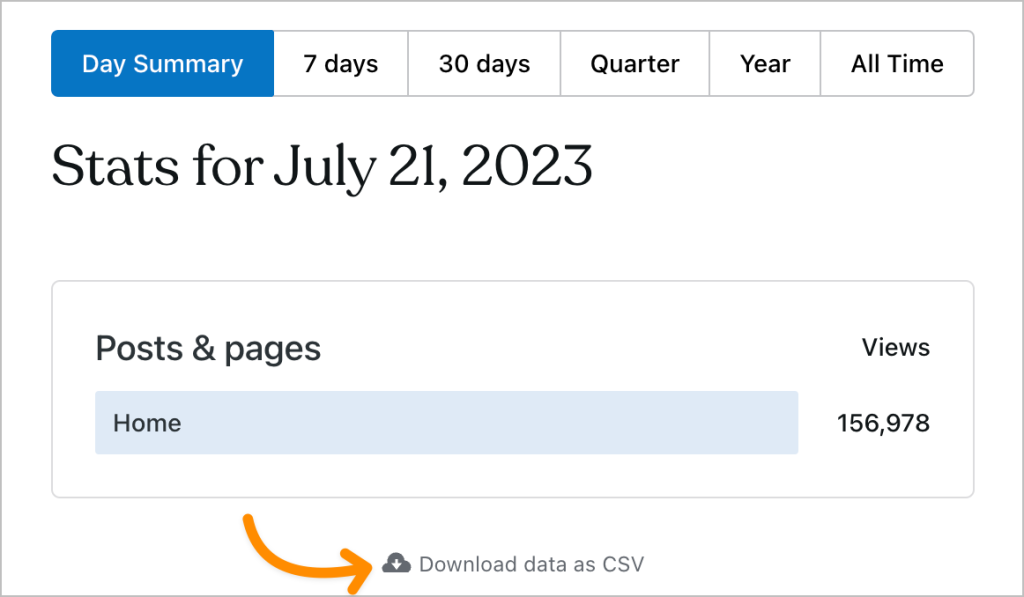
You can download reports of your stats as a CSV file by following these steps:
- Visit your dashboard.
- Click Stats on the left sidebar.
- Click the “View details” link at the bottom of any module on your Stats page, such as Posts & pages, Referrers, or Countries.
- Scroll to the bottom of the screen and click the “Download data as CSV” link.
- On some sections like Videos and File downloads, the “Download data as CSV” button is found at the top right.
- Save the file to your computer.
Jetpack Stats tracks and retains the following information about your site’s visitors:
- Post and page views
- Video plays
- Outbound link clicks
- Referring URLs and search engine terms
- Country
As part of collating the above information, Jetpack Stats uses data like IP address, WordPress.com user ID (if logged in), WordPress.com username (if logged in), user agent, visiting URL, referring URL, timestamp of event, browser language, and country code. However, none of this information is available to site owners. For example, a site owner can see that a specific post has 285 views, but he/she cannot see which specific users/accounts viewed that post. Furthermore, the Jetpack Stats logs, in which this information is stored, are only retained for 28 days.


