

The RSS Links Widget allows you to add links to your blog’s post and comment RSS feeds in your sidebar. This makes it easy for your readers to stay updated when you post new content or receive new comments. (You can learn more about RSS feeds and how they work here.)
💡
Themes that support the Site Editor do not use widgets, so you won’t see Appearance → Widgets in your dashboard. Instead, you can edit all of your site in one place at Appearance → Editor. Click here to learn how to use the Site Editor.
To add the widget to your site:
- In your dashboard, click on Appearance → Widgets.
- Choose the location where you’d like to place the widget on your site. Standard options include the Footer and Sidebar, but this may differ depending on your theme.
- Click either of the + block inserter buttons (see right) to see a list of all the available blocks and widgets.
- Scroll down to the Widgets section and click on the widget once to add it to your site.
For more general information, see this guide on working with widgets.
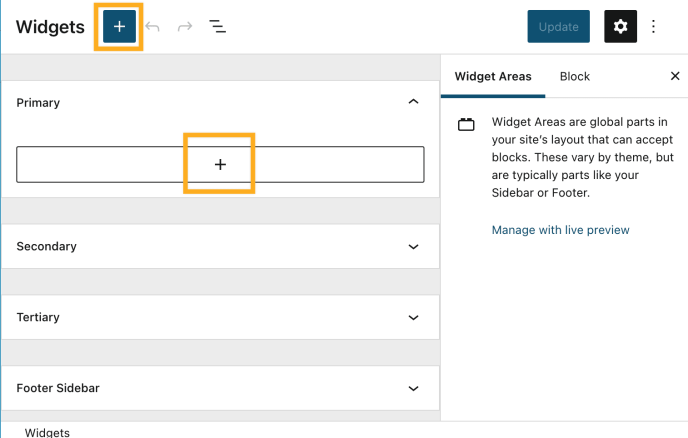
Once you add the widget to your sidebar, you’ll see the widget settings:
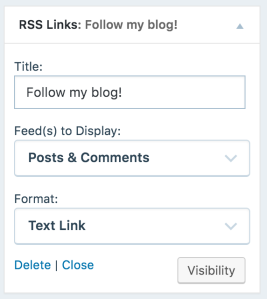
- Title: The title of the widget. (i.e. Subscribe, RSS Links)
- Feed(s) to Display: Choose between your blog’s posts feed, comments feed, or both.
- Format: Choose between text links, RSS icon links, or both.
If you have chosen either Image Links or Text & Image Links for your Format option, you will have two (2) more options.
- Image Size: The size of the RSS icon; choose between Small (14×14), Medium (28×28), or Large (64×64).
- Image Color: The color of the RSS icon; choose between Red, Orange, Green, Blue, Purple, Pink, or Silver.


