

The Top Posts & Pages Widget allows you to display either your most liked posts or up to ten posts that have received the most traffic in the past 48 hours.
💡
Themes that support the Site Editor do not use widgets, so you won’t see Appearance → Widgets in your dashboard. Instead, you can edit all of your site in one place at Appearance → Editor. Click here to learn how to use the Site Editor.
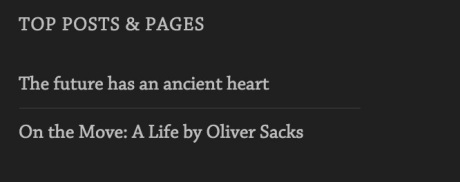
Here’s an example of what the widget looks like:
To add the widget to your site:
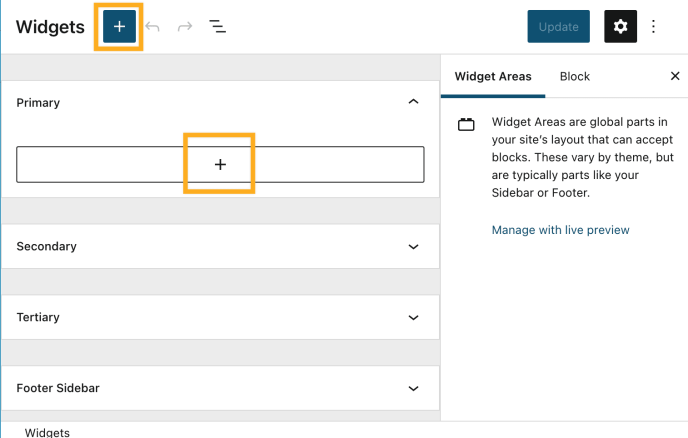
- In your dashboard, click on Appearance → Widgets.
- Choose the location where you’d like to place the widget on your site. Standard options include the Footer and Sidebar, but this may differ depending on your theme.
- Click either of the + block inserter buttons (see right) to see a list of all the available blocks and widgets.
- Scroll down to the Widgets section and click on the widget once to add it to your site.
For more general information, see this guide on working with widgets.

Title — Customize the widget’s title.
Posts to show — Select how many posts you would like to list, up to a maximum of ten.
Order Top Posts & Pages By — Select whether to show the top liked posts or the most viewed posts in the last 48 hours.
Display as — Choose from plain text links, links with post images, or a grid of larger post images.
Because this Widget uses the most recent traffic history for the site (past 48h), this could mean that the “Maximum Number of Posts to Show” won’t necessarily be the number of items displayed on the Widget. The Widget will control the maximum number of items to be displayed, but if the site has fewer items visited in the past 48h, it will show fewer items.
Example:
– Maximum Number of Posts to Show = Set to 4
– Number of Posts visited on the site within the last 48h = 3
– Number of Posts displayed on the Widget = 3


