

Wufoo is an internet application that lets you design online forms. When you design a form with Wufoo, it automatically builds the database, backend and scripts needed to make collecting and understanding your data easy, fast, and fun.
If you want to use a Wufoo form on your WordPress.com website, you can first create a free account, and then build your form.
💡
If you want to use Wufoo for embedding a MailChimp form on your site, it is still free to create a Wufoo account, but the MailChimp integration is now a paid service. JotForm offers a free alternative.
Once you publish your form, you can embed it into your WordPress.com site using a shortcode. To get the shortcode you first need to find the form you want to embed. You can find the code by clicking the Share option of your form.
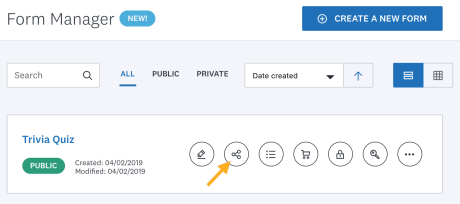
Once there click on Embed Form and copy the WordPress shortcode.
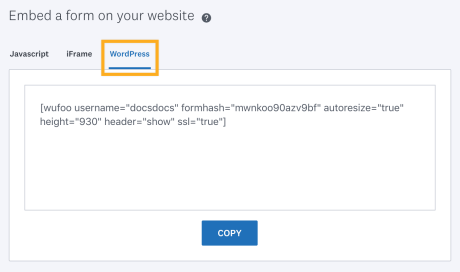
The shortcode will look something like this:[wufoo username="exampleuser" formhash="x7w3w3" autoresize="true" height="458" header="show"]
You can paste the shortcode on a Shortcode Block in the block editor.
If you want to capture visitor information into a mailing list and would rather have an embedded form in a widget, instead of the Mailchimp subscriber pop up, or the Mailchimp block, you can integrate Mailchimp with Wufoo.
Integrating Mailchimp with Wufoo allows you to embed a Wufoo form in a widget and the information collected will be sent to your Mailchimp list.
💡
In order to integrate Wufoo with Mailchimp, your Wufoo account will need to have a paid plan. JotForm offers a free alternative.
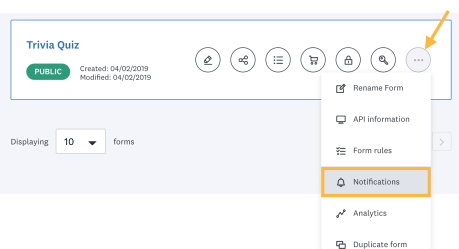
Once you have created the Wufoo form, click on the More option and click on Notifications.
Select Mailchimp from the “to Another Application” box.
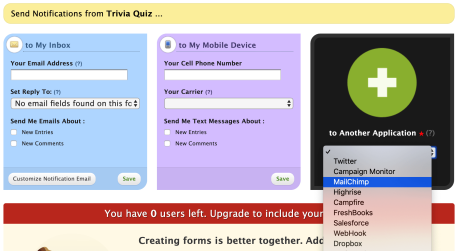
Follow the prompts to connect your Mailchimp account to your Wufoo account.


